The camera left GPS data behind
Phones and cameras routinely write latitude and longitude into the file’s EXIF metadata. When those tags exist the coordinates come straight from the camera — no guessing involved.
Every photo carries a hint about where it was shot. Drop in the picture and Where is this place tells you the place — the exact spot when the camera saved GPS data, and a reasoned guess from the scene when it did not.
 FROM A PHOTO TO A PLACE
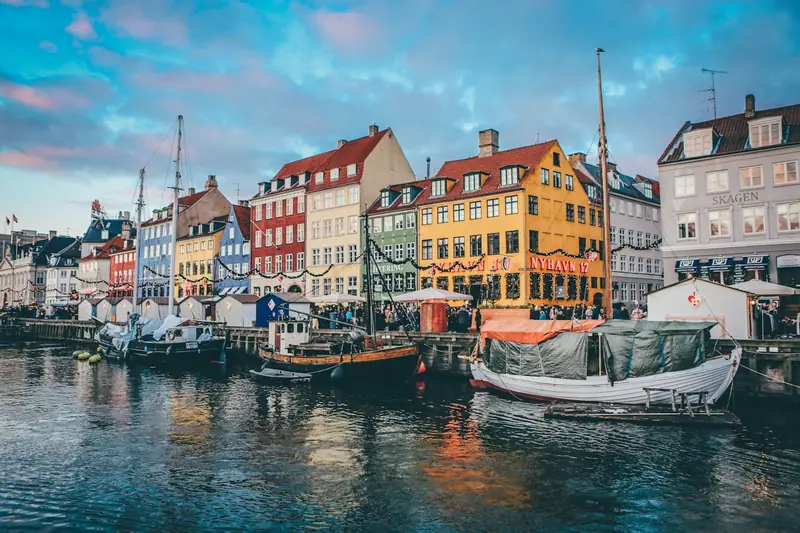
Copenhagen, Denmark
Colorful townhouses, sailing boats, and a historic canal: this is Nyhavn, Copenhagen’s waterfront district.
Some photos answer the question on their own. The rest need someone to read the scene.
Phones and cameras routinely write latitude and longitude into the file’s EXIF metadata. When those tags exist the coordinates come straight from the camera — no guessing involved.
Screenshots, reposts and edited pictures lose their coordinates. A vision model then reads the visible clues — building shapes, road markings, vegetation, signage, light — and proposes the most likely place.
Four moves, and you can stop after the first if the answer is enough.
Use the file straight from the camera or phone. Chat apps and social platforms usually strip the location data on the way.
GPS tags are checked first. Photos that still carry them get their recorded coordinates returned unchanged.
A vision model studies the picture and returns up to three candidate places, each with the visual clues behind it.
Open the place on the interactive globe and compare streets, skyline and landmarks with your own photo before you trust it.
A few of the photos visitors have run through the tool.
Example results are demonstrations. Every estimate still deserves a look on the map.
Short answers to the things people wonder about before uploading.
No. GPS tags are read when they are there, and the AI still works from the picture alone — which is what makes the tool useful for screenshots and photos shared in chat apps, where the location is always stripped.
When the file carries GPS tags, the coordinates are the ones the camera recorded. When the answer comes from the AI it is an estimate: usually right for distinctive landmarks and street scenes, unreliable for close-ups, interiors and generic landscapes. We have not published an independent accuracy benchmark.
Wide outdoor shots with readable signs, unusual architecture, mountains, coastlines or a recognisable skyline. A picture of one blank wall gives the model very little to work with.
It is read on the server to extract the GPS tags and, when there are none, sent to our AI provider for that single analysis. We never store your photo. The result is kept in your browser until you sign in, and saved to your account afterwards so you can look at it again.
Reading the photo and seeing the country is free and needs no account. Unlocking the exact place costs $4.99 for one photo or $9.99 for three, and monthly plans start at $9.90.
One photo is enough to get you a place, a coordinate and a clue.