Compare the skyline
Open the result on the globe and look for the same rooflines, towers and hills you remember in the image.
Two signals live inside a picture: the coordinates the camera wrote into the file, and the evidence a photographer left in the frame. Where is this place reads both and shows you how far the answer can be trusted.
 FROM A PHOTO TO A PLACE
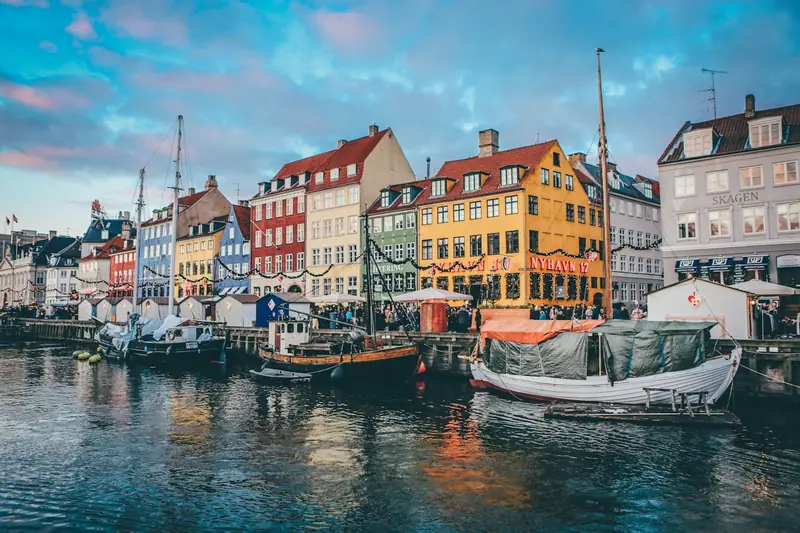
Copenhagen, Denmark
Colorful townhouses, sailing boats, and a historic canal: this is Nyhavn, Copenhagen’s waterfront district.
The same three moves work for a holiday snapshot and for a screenshot of a stranger’s post.
Location data lives in the original file. Every re-save through a chat app or an editor usually throws it away, which is why so many images arrive with nothing left to read.
GPS tags come first, because they are the strongest evidence. When they are missing, the vision model looks for the things a photographer would notice.
The place, the coordinates and the clues are saved to your account. Take them to the globe and check them against the image.
A location tool is only as good as your check. Four things worth doing before you pass a coordinate on.
Open the result on the globe and look for the same rooflines, towers and hills you remember in the image.
Kerb colours, driving side, bollards, road markings and the shape of signage narrow a city down quickly.
Sun direction, shadow length and what is in bloom tell you roughly where in the world the image was taken, and when.
A coordinate from a model is a starting point for a search, not a verified address. If it matters, confirm it against more than one source.
Pick one to see what comes back before you upload anything of your own.
These results are demonstrations, not a benchmark of accuracy.
GPS metadata is a set of coordinates written into the image file by the camera — a fact about the file. AI geolocation is a prediction: a model looks at the picture and estimates the place from what it can see. This tool reads the metadata first and only falls back to the model when the tags are gone.
Yes, and that is exactly where the AI earns its keep. Messaging apps strip the location data from images, so a shared photo can only be read from its content — landmarks, signage and architecture carry most of the weight.
No. The tool is built for travel and places, and the terms of service rule out using it to locate or track people. Please only upload images you have the right to use.
You can analyse as many images as you like. Unlocking the exact place instead of just the country is what costs: $4.99 for one image, $9.99 for three, or a monthly plan from $9.90.
An image with GPS tags comes back almost immediately. One that needs the vision model usually takes a few seconds. Either way the analysis is free and no account is needed to see the country.
Everything worth knowing before you upload the first one.
Drop in a picture you have been meaning to place, and see whether the file still knows where it was taken.